> ## Documentation Index
> Fetch the complete documentation index at: https://docs.isometric.com/llms.txt
> Use this file to discover all available pages before exploring further.
# Validation and verification
> CDR project validation and verification process managed through Certify from pre-screen to credit issuance with multiple stages
CDR projects must be validated before credits can be issued for any recorded removals. Isometric will work closely with you from onboarding through to credit issuance to ensure success.
The Validation and Verification process involves multiple stages, managed in the Certify platform and via your assigned Registry Operations Manager and contracted Validation & Verification Body (VVB).
## Process overview
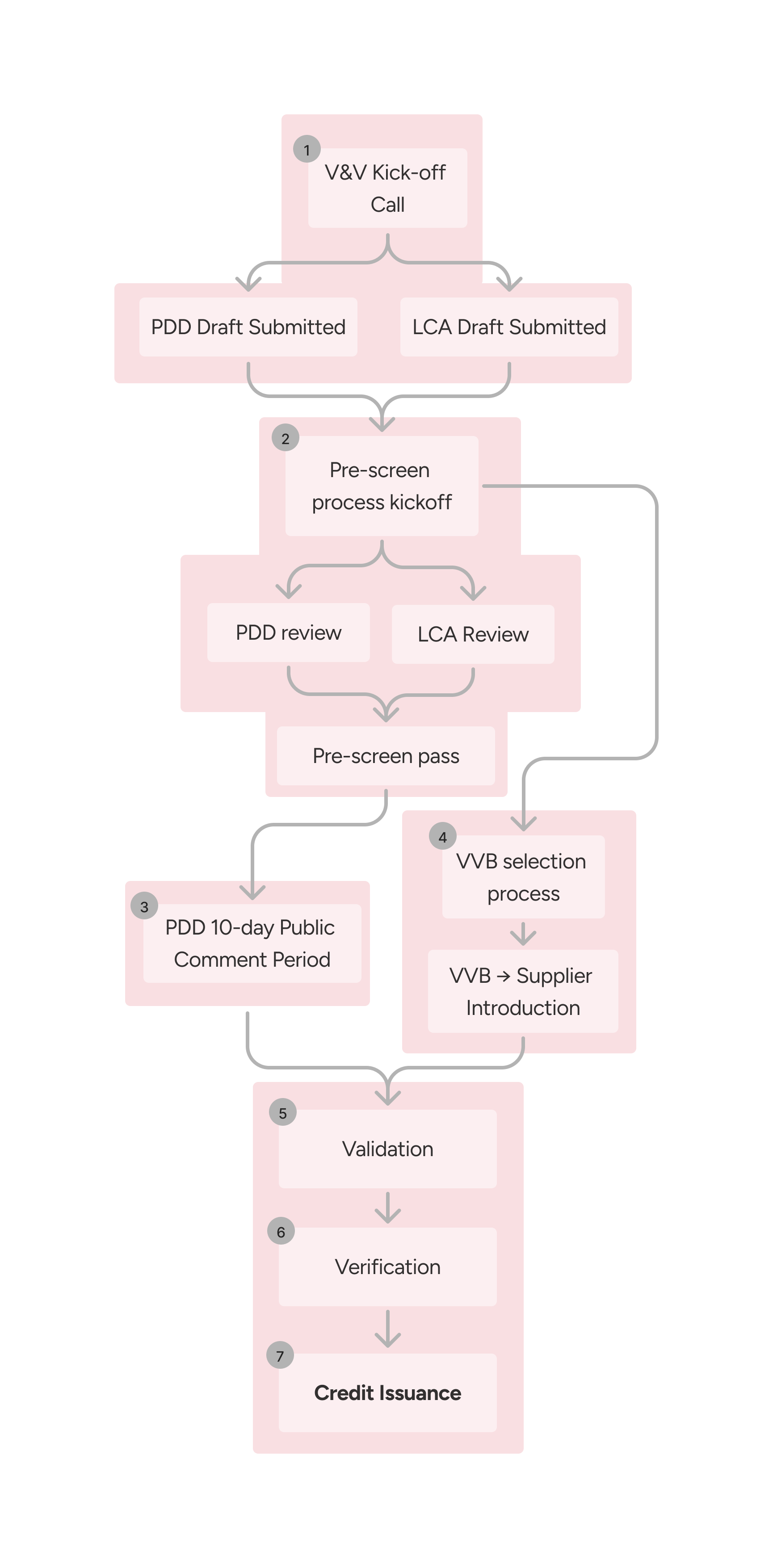 After signing with Isometric, you'll be introduced to your Registry Operations Manager (ROM), who will be your main point of contact throughout the Validation & Verification (V\&V) process — all the way through to credit issuance.
During the kick-off call, your ROM will:
* Walk you through the V\&V process in more detail.
* Introduce you to Certify, our platform where you'll create and submit your [project documents](https://registry.isometric.com/standard#documentation).
* Align with you on timelines and milestones.
* Set up next steps to get started.
Before we formally invite a third-party auditor, your VVB, we'll work with you to make sure your documentation is in great shape. You'll submit your Project Design Document (PDD) and Life Cycle Assessment (LCA) through Certify. Isometric's team of scientists and experts will then:
* Review each document in detail.
* Share comments and suggested changes via the platform.
* Iterate together until everything meets the [Isometric Standard](https://registry.isometric.com/standard) and relevant [protocol](https://registry.isometric.com/protocols).
Once key documents pass pre-screen, you'll be ready to move to the next stage.
In the final stage of the pre-screen process your PDD is published on the [Isometric Registry](https://registry.isometric.com/).
During this period, we invite subject matter experts, interest groups and the general public to provide feedback for a period of 10 days. Feedback is reviewed by Isometric before sharing with you and the VVB, after which amendments are recommended.
Any confidential or commercially sensitive data in the PDD can be redacted
in the public version of the document.
Once the pre-screen process has progressed, Isometric sends out a request for proposals (RFP) to its [network of accredited VVBs](https://isometric.com/governance-policies). During the RFP period, VVBs can bid for contracts to audit a project. Isometric will select a VVB for each project based on [several factors](https://drive.google.com/file/d/1KOmLuhU6yzCYYtUWPyQCw4aByEEJ7Q1-/view?usp=sharing), including experience in a project's pathway, knowledge of relevant regulations, and availability. Once selected, you'll be introduced to the appointed VVB, where project details are shared and a site visit is arranged.
A project's validation is a systematic and independent process for evaluating the methods that support a project and assessing whether the project conforms to the criteria in the Isometric Standard and applicable Protocol. Your appointed VVB will provide an assessment in a validation report, which Isometric reviews and publishes onto the registry page.
This involves a VVB's evaluation of a project's [Greenhouse Gas (GHG) Statement](/user-guides/certify/ghg-statement) submitted through the Certify platform, to determine whether it is materially correct and conforms with specified criteria. Verification assesses historical data and information to ensure that the GHG statement accurately represents your GHG emissions and removals, and that it complies with the Isometric standard and protocol-specific requirements.
After the Validation & Verification reports have been reviewed by Isometric and the project proponent and no outstanding amendments remain, a project is fully verified and credits are issued and listed on the Registry.
After signing with Isometric, you'll be introduced to your Registry Operations Manager (ROM), who will be your main point of contact throughout the Validation & Verification (V\&V) process — all the way through to credit issuance.
During the kick-off call, your ROM will:
* Walk you through the V\&V process in more detail.
* Introduce you to Certify, our platform where you'll create and submit your [project documents](https://registry.isometric.com/standard#documentation).
* Align with you on timelines and milestones.
* Set up next steps to get started.
Before we formally invite a third-party auditor, your VVB, we'll work with you to make sure your documentation is in great shape. You'll submit your Project Design Document (PDD) and Life Cycle Assessment (LCA) through Certify. Isometric's team of scientists and experts will then:
* Review each document in detail.
* Share comments and suggested changes via the platform.
* Iterate together until everything meets the [Isometric Standard](https://registry.isometric.com/standard) and relevant [protocol](https://registry.isometric.com/protocols).
Once key documents pass pre-screen, you'll be ready to move to the next stage.
In the final stage of the pre-screen process your PDD is published on the [Isometric Registry](https://registry.isometric.com/).
During this period, we invite subject matter experts, interest groups and the general public to provide feedback for a period of 10 days. Feedback is reviewed by Isometric before sharing with you and the VVB, after which amendments are recommended.
Any confidential or commercially sensitive data in the PDD can be redacted
in the public version of the document.
Once the pre-screen process has progressed, Isometric sends out a request for proposals (RFP) to its [network of accredited VVBs](https://isometric.com/governance-policies). During the RFP period, VVBs can bid for contracts to audit a project. Isometric will select a VVB for each project based on [several factors](https://drive.google.com/file/d/1KOmLuhU6yzCYYtUWPyQCw4aByEEJ7Q1-/view?usp=sharing), including experience in a project's pathway, knowledge of relevant regulations, and availability. Once selected, you'll be introduced to the appointed VVB, where project details are shared and a site visit is arranged.
A project's validation is a systematic and independent process for evaluating the methods that support a project and assessing whether the project conforms to the criteria in the Isometric Standard and applicable Protocol. Your appointed VVB will provide an assessment in a validation report, which Isometric reviews and publishes onto the registry page.
This involves a VVB's evaluation of a project's [Greenhouse Gas (GHG) Statement](/user-guides/certify/ghg-statement) submitted through the Certify platform, to determine whether it is materially correct and conforms with specified criteria. Verification assesses historical data and information to ensure that the GHG statement accurately represents your GHG emissions and removals, and that it complies with the Isometric standard and protocol-specific requirements.
After the Validation & Verification reports have been reviewed by Isometric and the project proponent and no outstanding amendments remain, a project is fully verified and credits are issued and listed on the Registry.